Vendor record
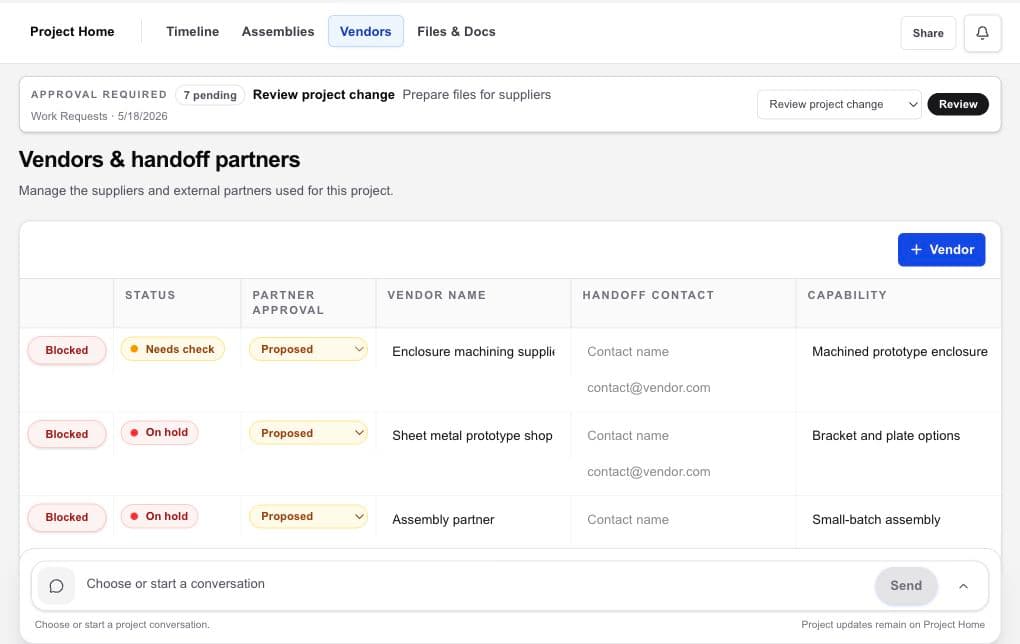
Keep capability, contact, recorded selection status, and ownership visible for each outside partner.

Vendor management
Workbench connects each vendor to the project capability, deliverable, files, recorded selection status, commercial context, and follow-up that explain why the relationship exists.
Hardware project management · design files · vendors · handoffs
The working problem
A contact database can tell you who a supplier is. It cannot tell the project team which files were sent, what the quote covers, which internal decision is pending, or what should happen next.
Vendor management should connect the relationship to the product work. Vendors remain independent, and your team controls contracts, due diligence, supplier qualification, and quality responsibility.
Inside the workspace
Keep capability, contact, recorded selection status, and ownership visible for each outside partner.
Keep NDA context, quote information, supporting documents, and current design files near the handoff.
Record the latest update and owner in Workbench while vendor email remains in your email client.
A practical flow
Choose from the Workbench directory or bring an existing partner into the project.
Record capability, contact, deliverable, files, NDA context, quote, and your selection status.
Keep received material, recorded updates, decisions, and outstanding questions with the project.
Name who owns the follow-up and what the vendor or internal team needs next.
What becomes clearer
A strong fit when
Keep exploring
Bring the hardware project together
Use Workbench to find, compare, select, and coordinate vendors. You choose whom to engage and keep control of every vendor relationship.