Vendor directory
Browse vendor choices available in Workbench when the project needs a new outside capability.

Vendor discovery
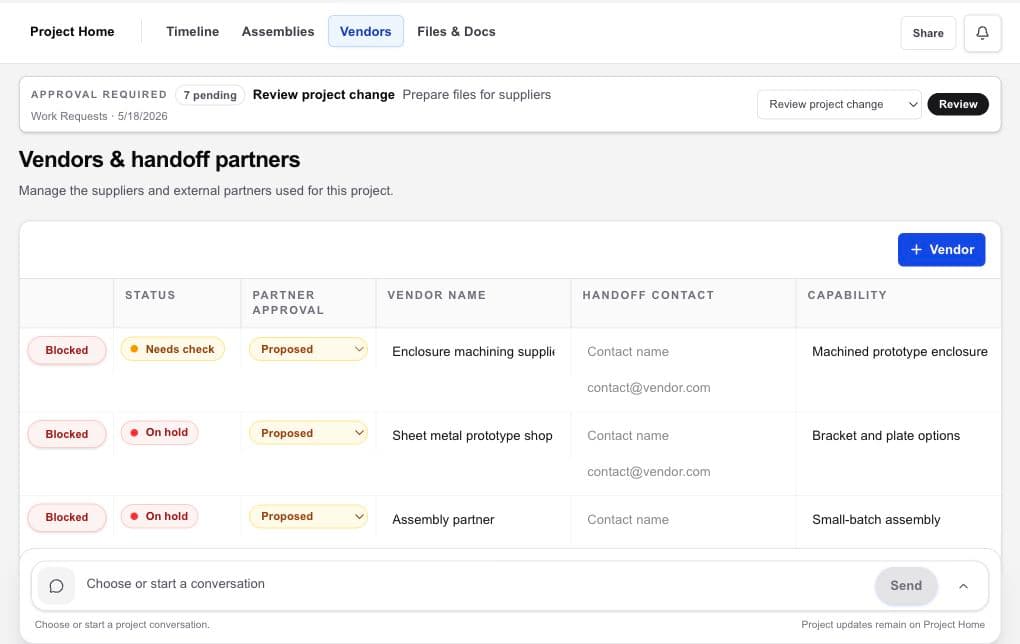
Workbench gives a hardware project owner one place to compare vendor choices, add existing partners, and keep the selection context tied to the project that needs the work.
Hardware project management · design files · vendors · handoffs
The working problem
Supplier discovery often produces a loose list of names without a durable record of capability fit, contact details, recorded selection status, or why one option moved forward.
HardwareHub owns and operates Workbench, and HardwareHub Consulting may appear as one optional owner-operated vendor. Discovery helps build a considered shortlist; a listing, order, or score is not an independent endorsement or guarantee. Vendors are independent, and you remain responsible for due diligence, technical fit, commercial terms, quality expectations, and final selection.
Vendor compensation disclosure. As of September 1, 2026, HardwareHub does not receive compensation from vendors presented in Workbench, except that it may receive compensation from Slingshot in some circumstances. You still choose, vet, contract with, and pay each vendor separately; a listing is not an endorsement or guarantee.
Inside the workspace
Browse vendor choices available in Workbench when the project needs a new outside capability.
Add an existing supplier or outside partner so the project record reflects how the work is actually being delivered.
Keep capability, contact, recorded selection status, and follow-up context together while you evaluate fit.
A practical flow
State the fabrication, design, assembly, testing, or other outside capability the project needs.
Browse the Workbench directory, add your own suppliers, or use both.
Record contacts, capability context, your selection status, open questions, and the next due-diligence step.
Choose the partner after the appropriate technical, commercial, quality, and legal review.
What becomes clearer
A strong fit when
Keep exploring
Bring the hardware project together
Use Workbench to find, compare, select, and coordinate vendors. You choose whom to engage and keep control of every vendor relationship.