Your candidate list
Browse the Workbench directory, add your own vendors, or evaluate both inside the project.

Supplier selection
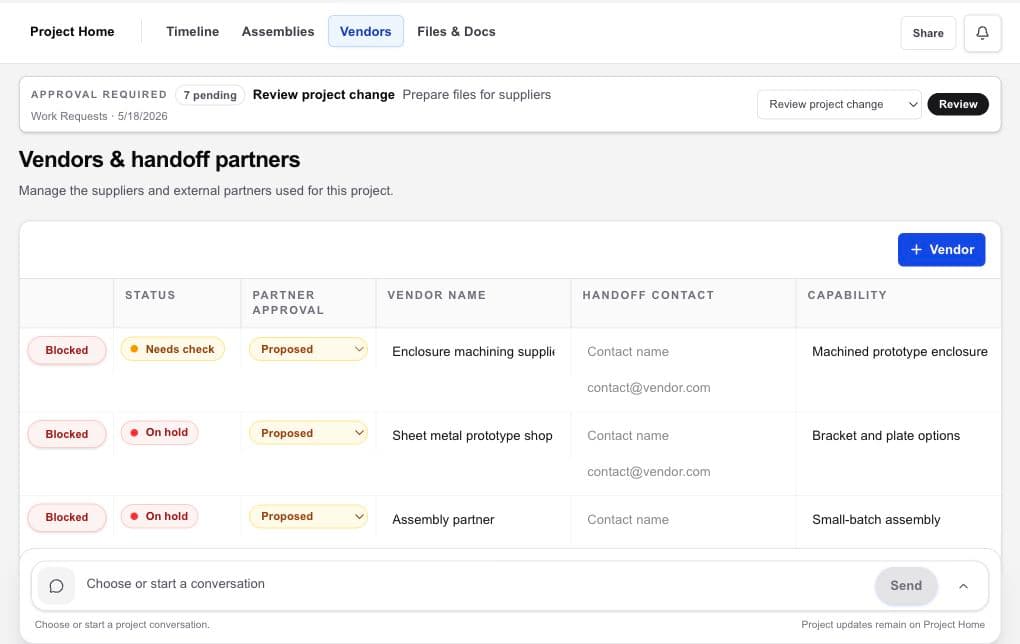
Workbench keeps vendor choices and team-sourced suppliers inside the same selection workflow, attached to the capability and deliverable the project needs.
Hardware project management · design files · vendors · handoffs
The working problem
A supplier list becomes difficult to evaluate when capability fit, contact history, quote assumptions, NDA context, and internal selection status live in different places.
HardwareHub owns and operates Workbench, and HardwareHub Consulting may appear as one optional owner-operated vendor. Workbench supports discovery and selection records; a listing, order, or score is not an independent endorsement or guarantee. Vendors are independent, and final selection requires your team’s technical, commercial, quality, legal, and risk review.
Vendor compensation disclosure. As of September 1, 2026, HardwareHub does not receive compensation from vendors presented in Workbench, except that it may receive compensation from Slingshot in some circumstances. You still choose, vet, contract with, and pay each vendor separately; a listing is not an endorsement or guarantee.
Inside the workspace
Browse the Workbench directory, add your own vendors, or evaluate both inside the project.
Keep each candidate attached to the fabrication, design, test, assembly, or other capability being evaluated.
Preserve contacts, recorded selection status, quote context, files, and why a supplier advanced or stopped.
A practical flow
Define the capability, deliverable, timing, and project context the supplier must support.
Add choices from the Workbench directory and the suppliers your team already knows.
Keep contacts, capability fit, NDA context, quotes, files, and due-diligence questions together.
Select the partner after appropriate due diligence and preserve the reason with the project.
What becomes clearer
A strong fit when
Keep exploring
Bring the hardware project together
Use Workbench to find, compare, select, and coordinate vendors. You choose whom to engage and keep control of every vendor relationship.