Files & Docs
Keep uploaded source files and living project documents in a library with useful categories, links, status, and modified dates.

CAD and file control
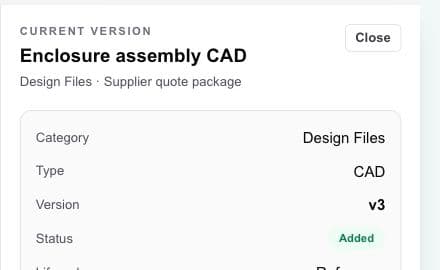
Files & Docs gives CAD, drawings, supplier files, and general project documents a clear home, while the current-file view makes version details readable in plain language.
Hardware project management · design files · vendors · handoffs
The working problem
A version number alone does not explain whether a file is current, what it supports, who needs it, or whether it belongs in the next supplier handoff.
Workbench provides practical project file control. It does not replace a formal PDM or enterprise PLM system when regulated change control and deep CAD integrations are required.
Inside the workspace
Keep uploaded source files and living project documents in a library with useful categories, links, status, and modified dates.
See the current CAD or document version, file type, release context, update date, and download action in one readable view.
Connect a file to the assembly, deliverable, vendor handoff, or project work that gives it meaning.
A practical flow
Upload a design source, drawing, quote, or other project file—or create the general project document you need.
Set the category, type, project link, status, and other context that helps people understand its use.
Keep version history with the record so the current file is visible without deleting the trail.
Open or download the version intended for the next review, deliverable, or vendor handoff.
What becomes clearer
A strong fit when
Keep exploring
Bring the hardware project together
Use Workbench to find, compare, select, and coordinate vendors. You choose whom to engage and keep control of every vendor relationship.